top of page
Shift Management

Managers often need to respond to problems and errors that occur while employees clock in and out of their shifts.
This tool enables managers to resolve problems as they arise, wherever they are, without having to visit their office.
Project Summary
Our managers needed a way to handle common labor issues resulting from employee clocking in and out. As more and more of our users integrate their mobile devices into their work lives, it was a simple decision to add this capability to our mobile app.
Project Dates
January 2021 to October 2021
My Contributions
-
Lead UX designer
-
high-fidelity interactive prototypes
-
lead user researcher
The Challenge
This was a new app. We knew from our research that we needed to support three common use cases:
-
Allow managers to approve shifts that the system identified as potentially problematic
-
Give managers the tools they needed to correct common timeclock-related problems
-
Give managers the tools necessary to approve employee-submitted schedule changes
Targeted Users
We targeted one main type of user for this project:
-
Floor managers of line-level employees (servers, housekeepers, etc. Shift workers)
See the targeted user persona below.

Home Screen
Each app has its own theme color to help managers easily differentiate the mode they are currently in, and the app they are in.
List items can be swiped open to allow for quick actions to be taken on individual records, or the manager can select a record to view all of its details.


Previous Design
New Design
Request Details - Approve Shifts
The information in these records is complex and needs to be presented in a way that a manager can quickly digest it and act upon it.
The details card is themed using the same color scheme as the home page, to make it simple for users to identify the type of record they are looking at.

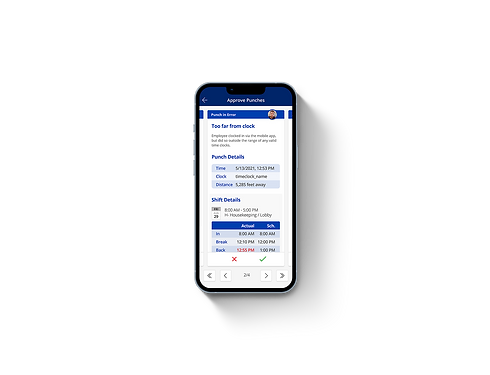
Request Details - Approve Punches
Card design is similar for each request type, but each type has its own data requirements and available actions.

Request Details - Fix Punches
Card design is similar for each request type, but each type has its own data requirements and available actions.
Conclusion
This project allowed us to refine the mobile UX for managers, and helped us simplify their lives by putting critical information in a place where they could access it from the floor, without having to return to their offices to sit at their computers.
Screens Gallery
Take a closer look below at the screens featured in this case study.


bottom of page