Using ChatGPT to create a Perspective Grid
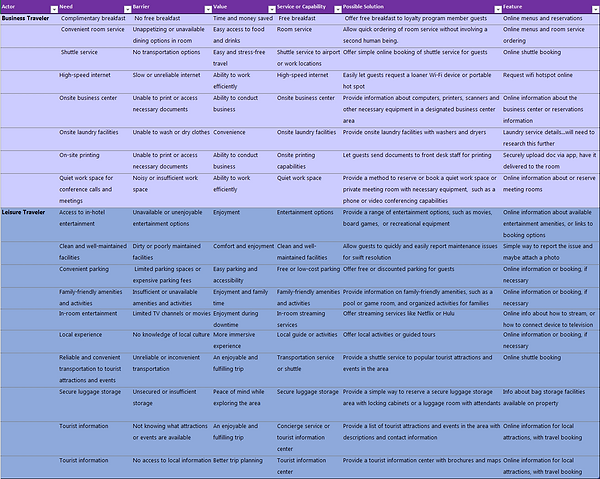
For a personal project, I decided to try looping generative AI into aspects of the workflow. For the screenshots below, I created a perspective grid using input from ChatGPT. I have not included the entire process, but you can see my initial prompt and some of the final output from the AI.
Note that I have not verified any of these suggestions with research. However, given the collaborative nature of perspective grids, and the informed but informal process that is deployed to create them, I felt using AI as a stand-in for those stakeholders was acceptable.
I expect in a true brainstorming session with internal stakeholders such as sales, marketing, support, and product design, we would see more variety, and perhaps more domain-specific knowledge than what is seen here. But I am satisfied with the output.
Again, in a professional setting, you should not rely on AI as a stand in for your stakeholders or your users.
Having said that, let's dive in!
The prompt
I was specific about the output that I wanted from the AI. That's an important step when using ChatGPT. You'll get better results if you are specific about the output you want. I also provided an example of the type of answer I was looking for.
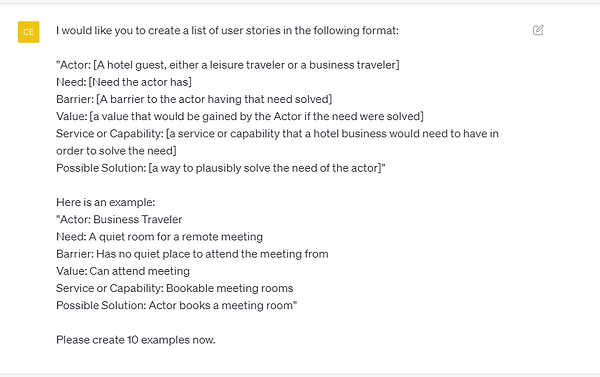


I asked the AI to generate the final output in .csv format for easy importing into Excel. It did this with only minor complications. It added commas in the middle of lists, which confused the CSV import in Excel. But that was cleaned up easily enough.
From there, I tweaked the suggestions from the AI so that they made sense within the context. I removed any items not related in some way to the app (the AI made suggestions like "build an onsite gym for hotel guests" and other unhelpful ideas).
Finally, I brainstormed features that could deliver the possible solutions.
You can see the final perspective grid below or view the full case study.